
Script
Anaglyph Previewer
 By MarTroYx · Credited author: Martin Dufour · 2009-07-28
- Version
- 1.03.76
- Version requirement
- 2009
- Date updated
- 2010-10-29
- Votes
- 42
- Homepage
- http://martroyx.890m.com
Downloads
- anaglyph_previewer_1_03_76.rar — anaglyph_previewer_1_03_76.rar58 KB
Tags: Misc, Cameras, RenderEffect, viewport
Description
Additional Info
----------------------------------------------------------------------------------
1 : INFO
----------------------------------------------------------------------------------
SCRIPT NAME : ANAGLYPH PREVIEWER
3D STUDIO MAX : 2009/2010 32/64BIT
AUTHOR : MARTIN DUFOUR
MAIL : MARTROYX@HOTMAIL.COM
WEB : HTTP://MARTROYX.890M.COM
RELEASE DATE : AUGUST 07, 2009
----------------------------------------------------------------------------------
2 : INSTALL
----------------------------------------------------------------------------------
Extract the content of this archive to your '3dsmax\Scripts' directory.
From inside 3dsmax, select Maxscript->Run Script, browse to your scripts
folder and select the .mcr file and hit ok.
to add a shortcut to your toolbar and/or menu, goto Customize->Customize user interface
and find the new category named "MarTroYx".Drag the script name to your toolbar and/or
menu definition.You can also drag the .mse file into your viewport to start the script.
NEWS -->You have to delete the old .ini file if you have an old version installed since
NEWS -->new settings has been added....(your3dsmaxfolder\\Scripts\\Anaglyph_Previewer.ini)
----------------------------------------------------------------------------------
3 : FAQ
----------------------------------------------------------------------------------
Q: Why's one of my viewport's flickering ?
A: In order to render the output image, the script has to take a screenshot of both
camera...the more depth you use, the more flickering you get!
Q: Why it is so slow ?
A: GDI+ & maxscript...but there's a couple of thing you can do to improve the framerate :
->use a smaller viewport.
->use an even smaller viewport.
->use a tiny viewport.
->set the Compositing Quality to Highspeed.
->uncheck mouse update.
->uncheck Process output.
->uncheck safemode.
->uncheck Desaturate.
Q: Why does the script capture everything in front of the viewport ?
A: In order to keep a ability to use the others viewports and interact with the scene,
another capturing technique had to be used...so just make sure there nothing in the way
when you do a make preview.
Q: I don't like your camera, can I use mine ?
A: Yes of course ! Use the two button in the setup page to pick your camera...
expect strange thing to happen throught :-P
Q: Why the script didn't remember any settings ?
A: it remember it now :-)
Q: I want to use another viewport for rendering, Can I ?
A: No, capturing viewport is always index 1!
Q: Why there's so many mispelling ?
A: I'm a french guy, if you find any...let me know! (in a polite way of course!)
----------------------------------------------------------------------------------
4: KNOWs BUGS
----------------------------------------------------------------------------------
--you can't cancel once you pressed the make preview button...so be sure you really want a preview :-)
--some codec don't work, if that the case then chose another one.
----------------------------------------------------------------------------------
5: scripts fix\changes since 1.02.25
----------------------------------------------------------------------------------
1.02.31-->Added a .ini setting to controls the internal channel swap, as I was told, it was inverted.
1.02.31-->Added a check to prevent crash if another camera with custom attribute is present in the scene.
1.02.31-->Added try/catch for viewport index in case the user has extended tools in viewport.
1.02.35-->Corrected the z-order drawing when using channel swap ...everything should be fine by default now.
1.02.35-->Added ini settings for all the parameters.
1.02.35-->Removed the safe mode .(was not activated anyways)
1.02.35-->Removed R_mode inisetting & replaced with a combobox in the setup for more easy switching.
1.02.35-->Removed ini seting to enabled Pixelop, now enabled by dafault.
1.02.35-->lot of other little fix.
1.02.36-->Fixed a major bug,that I introduced with the makepreview.
1.02.36-->fixed another bug with the makepreview if the range was equal.
1.02.36-->two other minor bug fix.
1.02.37-->Changed the contrast/brightness/saturation spinner increment to 1 to allow much more granular controls.
1.02.37-->Added a reset button, to reset all spinner to their default value.
1.02.37-->Added a Fit 1:1 button to fit the rendering view to the viewport. Note that since the inteface has a minimum size it doesn't work well on smaller view!
1.02.38-->Fixed float value with framerate spinner.
1.02.62-->many improvement since 1.03.54 :-)
1.03.63-->fixed duplicate assembly.
1.03.63-->fixed the cancel makepreview.
1.03.63-->disabled the prev button while the user input codec settings.
1.03.63-->fixed the captured codec dialog on first frame.
1.03.63-->output now automatiquely adjust it's size to fit multiple of 4...( 1-3 pixel wide black line may appear to the right or bottom depending on the captured viewport size)
1.03.65-->script now remember allmost all the settings.
1.3.68-->fixed a bug while returning the from color dialog in auto mode.
1.3.68-->added additionnal check: if a scene is loaded with a valid camera,
the script will first try to select that camera before showing the warning dialog.
1.3.68-->added directory selection dialog for the output path.
1.3.68-->removed useless bmp property, since it caused a bug sometime...will add some label to show the viewport size later on :-)
1.3.68-->added some maxlike spinner to control the numeric value ...not entirely finished, so it may introduce some bug (let me know:-)
1.3.68-->the script now save the contrast, brightness and saturation value.
1.3.69-->added back the old cam until I get the new one working...
Comments (44)
MarTroYx · 2010-10-29
I have repackaged the whole thing just to make it easier ...download link at the top :-)
Cheer !!
Vistadimix · 2010-10-29
Thank you so much! Everything works! :)
MarTroYx · 2010-10-29
Ho, then you can download the file "Anaglyph_Previewer_1_03_74_fix.rar" a couple of post bellow which contain the exact same dll file or use sharpdevelop to compile the assembly !!
edit : in this case you have to change the version number at line 3 of the script file from 72 --> 74
MarTroYx · 2010-10-29
Sorry mate , you where absolutely right ...I tested it on my system and it appear it was not working at all but I found back the right version (and actually tested it this time :-) so now everything should work :-)
Attachments
- mtxstereoengine.rar — mtxstereoengine.rar27 KB
Vistadimix · 2010-10-29
Thanks for the help, but could not you compile .dll? I have not been established Visual Studio...
MarTroYx · 2010-10-28
ok got it ,
if you are getting this error, it can only mean one of the following :
1 : the assembly failed to load into 3dsmax namespace, so you have to make sure the .dll is located in
the same directory as the main script file as stated before, then restart 3dsmax and try again. if it still don't work, you can try specifying the direct path to the assembly at line 19 and comment/delete the line bellow.
2:the namespace of the assembly has changed, in this case you need to provide line 119 with correct path to create the form!
Hope this help,
Martin
MarTroYx · 2010-10-28
Ho , almost forgot ... if you are building the assembly, you have to make sure the version number match with the one from maxscript ...this may be why your getting this error ???
MarTroYx · 2010-10-28
I just noticed that I left some edit I made before I post it ...just remove the "::" at line 15 else it wont work :-)
Please help!
Vistadimix · 2010-10-28
Hello, started your plugin on 3dsmax 2011 x64, and got an error. Screenshot of error attached. I would be very grateful if you help. I'd like to try your plugin!
Attachments
- error.jpg — error.jpg17 KB

MarTroYx · 2010-10-28
Hi Vistadimix,
Have you tried to change the version number at line 3 ...change the 72 part for a 74 also make sure the main .dll file is located in the same directory as the main script file !
MarTroYx · 2010-10-29
Ho ! found it back :-)
since I won't update it anymore , I'll leave it here in case someone want to mess with it ....just don't look to much at the code was one of my first test :-)
Best regard,
Martin
MarTroYx · 2010-10-28
Here it is ....you can change the version number at the top to match the version of the assembly your using !!!
Cheer :-)
Attachments
- anaglyph_previewer_1_03_7xx.ms — anaglyph_previewer_1_03_7xx.ms34 KB
MarTroYx · 2010-10-28
I don't think I'll be updating this one with new feature or anything since I don't have the assembly anymore but I can fix the script to work with 2011 ...which version r u using ?
 Daniel Wichterich · 2010-10-27
this script is really amazing! any chances that you might develop this one for max2011?
MarTroYx · 2009-12-15
so here the fix, still not sure if it really work ...let me know!!
Martin
Attachments
- Anaglyph_Previewer_1_03_74_fix.rar — Anaglyph_Previewer_1_03_74_fix.rar59 KB
MarTroYx · 2009-12-15
well, it does work :-)
edit: in win7 at least so I guest it will work in vista also ...what I'll do is to modify the version .69 to integrate this, since .72 is not stable enough !
MarTroYx · 2009-12-15
also since 3dsmax is the host process I'm pretty sure it will fail...
MarTroYx · 2009-12-15
ok, this look promising...unfortunatly no vista to test on ...
http://spazzarama.wordpress.com/2009/09/30/enable-or-disable-dwm-composi…
MarTroYx · 2009-12-15
I don't think I can fix this...well maybe I could find a workaround ...but only got xp64 to test on, and my computer doesn't like vista I crash at the logo screen with random green square flashing everywhere :-P
but I'll do some more search, maybe someone else already found a solution !!
 3dhippie · 2009-12-15
yay. switching from aero to classic design worked. cool. too bad it doesn't work with aero-design though, can you fix that?
MarTroYx · 2009-12-13
hum, unfortunately no, I'm using win32 bitblt, are u sure you switched off the style , use something like classic style or I don't really know what they call it in vista maybe even do a reboot may help !
3dhippie · 2009-12-13
no, i'm using win Vista. Turning glass mode off didn't help. But i discovered that viewport.getviewportDib() doesn't work properly on my computer. gw.getviewportDib() however does. If that is part of your script it might be a clue.
MarTroYx · 2009-12-12
Ho well, max won't start in vm and I dont have any spare hd to boot from ...anyway I think the main problem is the skin that they put that prevent capture from working ...I remember that I read this somewhere but I don't remember if it got a solution ...maybe you could try shuting down glass style and see if it help !!!
MarTroYx · 2009-12-12
I haven't got a chance to test under win7 I assume it win7?
anyway I'll do some test in vm later on ... have you tried in 32bit to see if it work ?
Martin
3dhippie · 2009-12-12
nope I still don't get a working preview. All i get is either a black or grey area. If i hover with my mouse over some object the tooltip with it's name appears and stays. Look here (http://img205.imageshack.us/img205/9361/previewer.jpg).
The upper right viewport does flicker, though.

Sorry for mistaking your feature for a bug :-D
MarTroYx · 2009-12-12
I forget to tell that you need to have a valid camera selected ...that maybe why your not getting any drawing ...and for the detaching menu, it not a bug it a feature :-)
you can double click to close it:-)
regard,
Martin
MarTroYx · 2009-12-12
Hi 3dhippie,
humm, that weird I use 2010 x64 too and it working fine!
fix custom rig is a function that fix custom stereo cam to work with the script.
I've got an update on the way for this one but it not entirely finished since I started working on another script... not every thing has been added back but should work I think....could you tell me if you get better result with this one instead ?
Martin
Attachments
- Anaglyph_Previewer_1_03_72_Beta.rar — Anaglyph_Previewer_1_03_72_Beta.rar59 KB
3dhippie · 2009-12-12
just stumbled over this script. looks very promising. Unfortunately, I can't get it to work. The Preview window is grey at all times. I'm using 3dsmax 2010 64bit. The buttons behave a little weird as well (The create new camera button is a transparent floating thing, that will stay at it's screen position until i type something and press return).Also, what does fix cutom rig do? Looking forward to getting this script to work :-)
MarTroYx · 2009-11-18
I recommend that you do not use the camera from 1.03.62 it's for testing purpose only and it's still under dev, you can add your custom camera from the main menu ... I think it should work with pretty much any setup, let me know if it doesn't :-)
 aaronbradbury · 2009-10-12
This is extremely useful for realtime stereoscopic feedback within 3ds max. Thanks
arcane_raven · 2009-09-17
i'll keep an eye on this then script!
MarTroYx · 2009-09-05
Here the new version ... the makepreview is not implemented yet, but almost anything else from the old version should work...
Hope you like it :-P
Martin
Attachments
- Anaglyph_Previewer_1_03_54.rar — Anaglyph_Previewer_1_03_54.rar41 KB
MarTroYx · 2009-09-04
Thank arcane raven,
I've got an update almost ready for this one ...in fact I've redone it from scratch with a new faster& more accurate c# engine ...stay tuned :-)
Martin
arcane_raven · 2009-09-02
I Would like to thank you, because I appreciate your hard work on this Script! Oh Your Spelling is great for English not being your primary language.
MarTroYx · 2009-07-31
for those that have problem making their custom camera work with the script because of parameters wire, you need to make sure that the left cam of your setup is free to be moved around while still maintaining it original constrain. one way to do this is to add a position list with a free position controller on top, the following code snippet will do it for you :
select you left cam and execute
(
old_ctrl=$.position.controller
unlock_ctrl=position_xyz()
pos_list=position_list()
$.position.controller=pos_list
pos_list.delete 1
pos_list.available.controller=unlock_ctrl
pos_list.available.controller=old_ctrl
)
if not then contact me with a sample of your camera and I may be able to help you out.
Thank,
Martin Dufour
MarTroYx · 2009-07-30
ok , last picture was a bit over exaggerated this one is more easy one the eye I think :-)
MarTroYx · 2009-07-30
see what I mean :-)
MarTroYx · 2009-07-30
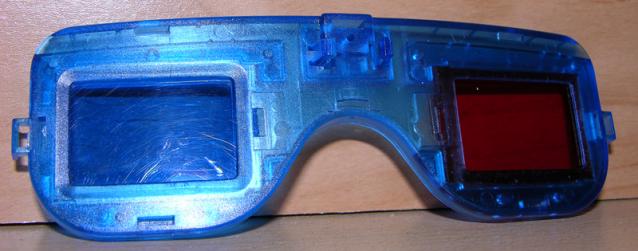
the one I have right now are crap , it's a modifier nvidia stereo shutter glass in which I removed the shutter and replaced with plastic filter ...but I thing the color is not right !
MarTroYx · 2009-07-30
I want good stereo glass ... what are the best glass when working with a computer lcd screen , can somebody help me , I want to be able to see what I'm doing in not anaglyph application without removing the glass every time ??
MarTroYx · 2009-07-29
Oups sorry, wrong version ...1.02.31 is the one with channel swap ...my bad , I'll go get some sleep :-)
MarTroYx · 2009-07-29
ok, license system was weak, thank to everyone that registred, now I know the mistake that I made and that's was the goal too :-P
The script is now entirely free and registration not required anymore ...here's a activation number everyone can use to activate :
FREE FREE
32924578013467902
edit : dont forget to press the get request button before entering the autorisation number!!
...now back to the drawing board :-)
MarTroYx · 2009-07-28
thank fajar, that's devexpress component, it come with max since max9 or 2008 , can't remember it a bit more work to setup through :-)
edit : I linked a script to help you get started :-)
Attachments
- show_assembly_constructor_04.ms — show_assembly_constructor_04.ms1.5 KB
fajar · 2009-07-28
damn it MarTroYx, you have good and nice UI interface, just how you make it!? teach me!! is that compund from bitmap and dotnet or just purely dotnet or just bitmap!! ....
very nice good job done!
MarTroYx · 2009-07-28
just added the description even if the name itself describe it well I think :-)