ScriptSpot

Script

83pig's Isolated display

By luckmc · Credited author: 83pig · 2016-04-25

Version
1.0
Version requirement
3dsmax2008-3dsmax2014
Other software required
3dsmax
Date updated
2016-04-25
Votes
1
Download
Download
Description

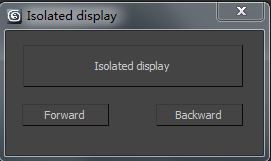
Isolated display

Instructions:

1.Isolated display,Comes with 3dmax 'Select isolated' 'are different。

2.Select the isolated object, modify the model alone, then click once to select isolatedbutton. It can be repeatedly isolated objects.

3.When repeatedly isolated model, click on the "forward" or "backward" and would not showall objects in the scene.

4.Try several times, very convenient.

Isolated display

Tags: 3ds max, 3ds max script, Isolated display

Comments (2)

jsrocha · 2016-04-26

Very nice script.
Is there a way to "separate" the functions, to be possible to configure keyboard shortchuts to each one? like "i" to isolate, "B" to Backward and "F" to forward. I´m used to access this kind of command via keyboard.
Anyway, this is a great tool, thanks!

Jsrocha

luckmc · 2016-04-27

Enjoy it!