ScriptSpot

MCG

MCG Mesh Contours

By vusta · 2017-06-14

Version
1.04
Version requirement
2016
Other software required
2016 + Extension1/2 + SP3, 2017, 2018 (did you see I wrote Extension for 2016 ??? did you spend a few seconds to read ?)
Date updated
2017-09-21
Votes
11
Description

What's there to say really...

Installation for Max 2016/17: (2018 can be just drag+drop)

https://knowledge.autodesk.com/support/3ds-max/learn-explore/caas/CloudH…

Then can be found in Create>Shapes>Vu.

ver 1.01: added Join Threshold so that a loop/element is now properly welded. Previoulsy, if you rclick>show vertex ticks, you'd see all white verts (they're hidden coz they overlap)....with this new one, you'd see yellow ones since they're now welded.

ver 1.02: backed out the Join option. Due to the fact that the way the splines are created is quite messy, the Join would create more problem than it solves. So out it goes, I've added the option to Flip the Slice Plane tho, also a REMINDER to move the MCG object to Origin first !!!.

verr 1.03: Single Mode for if you want just 1 resultant Spline instead of possible multiples, like for a Teapot, you may get one slice resulting in 3 splines across the handle + body + spout. You move the Gizmo (Rectangle) around till you get close to the candidate spline that you want (it IS a bit dodgy...)


ver 1.04: increased Gap limit to 9999999

Videos
Attachments

Tags: MCG Mesh Contours

Comments (14)

Chrome now says this is unsafe

marcusw · 2023-08-19

Chrome won't let me download it as it says the file is unsafe :(

Great MCG when you understand the method

marcusw · 2023-08-19

This MCG is super useful for Landscape architects.
Great work. Hope the download issues can be fixed.

Slice missing on some faces.

thewool · 2022-10-10

Hi, Great script, but seems to miss some cuts randomly, especially when slicing guide is rotated. Any ideas? Max2022.


Maximum Gap Size

peter_fischer · 2018-09-20

Hi Vusta,

Thanks again for this great script. I use it often. However, at the moment, I am working in a model with millimeters as system units, and despite the fact that I am using meters as the display units, the script still only allows a gap size of 999.0 (999.0 mm). Therefore, if I am trying to use it to represent floors at say 4000mm (4-meter display units) it will not work. Is it possible to not limit gap size, or have the gap size represent the display units instead of system units? Unfortunately, 999.0 mm is not workable in this case.

Thanks in advance,
Peter

ver 1.04

vusta · 2018-09-21

increased Gap limit to 9999999

re: Maximum Gap Size

peter_fischer · 2018-09-21

you are my hero. thank you very much!!!!

U6Soft · 2018-01-24

Thanks. I guess it can be useful in different design.

isn't the video in this post ?

vusta · 2017-07-20

i just assume it is...even tho i can't see it..cuz i refuse to install that s**tty adobe flash plugin...

next time i'll just paste the video link in rather than put it in the video section.

pick mesh not working

fil47 · 2017-07-11

The modifier panel shows only the regular settings for shapes or mesh. If I pick the mesh and go in modifier panel there is nothing more than what was there before.Same goes for the shape.

ok this is not meant to be rude....

vusta · 2017-07-12

but are you on 2016 and do you have the Extension ?

(see REQUIREMENTS)

just to be clear...

vusta · 2017-07-13

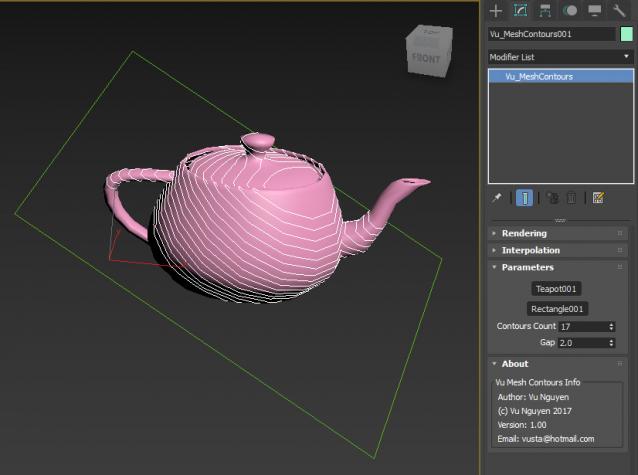
01) create teapot

02) create rectangle

03) Create>Shapes>Vu>click Vu_Mesh Contours button...now click somewhere in the viewport to create the MCG object....ie. do NOT pick either the teapot or rectangle yet.....

>>> you must create the MCG object first <<<

then you pick the teapot or rectangle in any order...

pick mesh not working

fil47 · 2017-07-04

When trying to pick the mesh or the rectangle, the VU dialog closes off, giving me no chance to pick the other one.
Great idea, could use that...

just select the MCG object...

vusta · 2017-07-04

and go into Modifier Panel ?